










Your Paid Social, Finally Unified: Meta & TikTok Cost Data in GA4
Google lists the October 7, 2025, release in its official “What’s new in Google Analytics” changelog. Several industry summaries also covered the update in the following days.
The native integrations allow you to import Meta and TikTok cost data into Google Analytics, which reduces a lot of manual work for marketers and improves stakeholder information accuracy. Your paid social spend, clicks, and impressions can now flow into GA automatically. There is no need for CSV uploads or fragile third-party connections.
When your performance data is scattered across different tools, you waste time reconciling numbers and risk making slower or incorrect decisions. Centralizing paid social costs in GA helps you:
The ultimate goal is a unified, independent, and accurate marketing mix analysis.
Here’s how that works in practice:
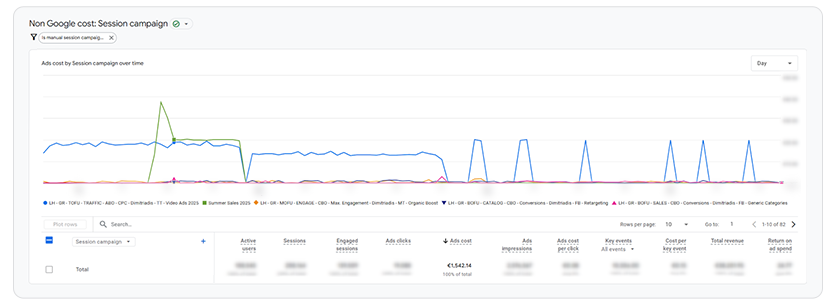
Once connected, GA4 fills Ads cost, Ads clicks, and Ads impressions for your Meta and TikTok traffic.
You can also elevate these KPIs into a customized report snapshot so stakeholders get the essentials at a glance.
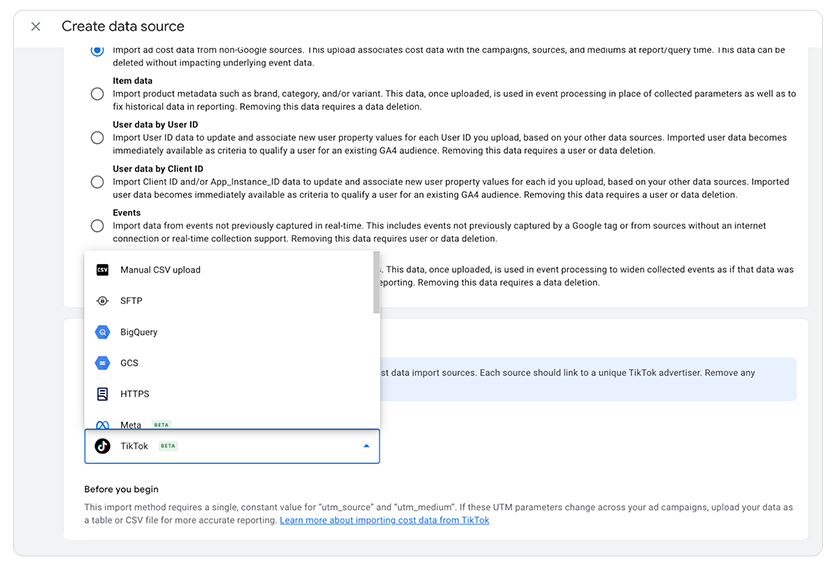
Google added native Data Import connectors for Meta Ads and TikTok Ads. After a one-time authorization, GA backfills historical data (subject to platform limits) and keeps it updated going forward.
Setup at a glance (per platform):
Hygiene notes
Already live for Lighthouse clients
We’ve already enabled these connectors across multiple Lighthouse accounts, aligning paid social costs with GA conversions and ecommerce KPIs. If you want to know what a top performance agency can do for your business, reach out to your Lighthouse team.
👉For step-by-step setup instructions, see Google’s guide here
The native integrations allow you to import Meta and TikTok cost data into Google Analytics, which reduces a lot of manual work for marketers and improves stakeholder information accuracy. Your paid social spend, clicks, and impressions can now flow into GA automatically. There is no need for CSV uploads or fragile third-party connections.
When your performance data is scattered across different tools, you waste time reconciling numbers and risk making slower or incorrect decisions. Centralizing paid social costs in GA helps you:
- See true CPA/ROAS across Google, Meta, and TikTok in a one view.
- Compare channels as apples-to-apples using consistent source/medium/campaign taxonomy.
- Spot wasted spend faster with cost, clicks, impressions right next to key events and revenue.
- Keep reporting clean and scalable with standardized naming.
The ultimate goal is a unified, independent, and accurate marketing mix analysis.
Here’s how that works in practice:
-
Unified reporting and a holistic view
The issue: Without the connection, GA4 shows revenue and conversions from Meta traffic, but the cost column is blank. This means you can’t calculate ROAS, CPA, or CPC inside GA4. Additionally, conversion data can be tricky to monitor in the respective platform due to attribution models and signals.
The fix: By importing Meta (and TikTok) costs, you can assess Google Ads, Meta Ads, SEO, Email, and more in a single dashboard. Reporting becomes easier, and you avoid the need to manually merge data and address attribution gaps from different sources. - Accurate ROAS and CPA, using GA4 attribution
ROAS is essential in performance marketing. With costs available in GA4, you can use GA4 attribution models (e.g., Data-Driven Attribution) to determine which channel truly contributed to the sale and calculate Meta’s actual ROAS throughout the user journey, not just the last-touch figures.
- True “like-to-like” comparison across channels
Conversion counts in Meta Ads Manager and Google Ads almost always differ from what you see in GA4 because each platform uses different attribution models and lookback windows. When you import costs into GA4, you can compare Google Ads vs. Meta Ads using the same model and criteria (GA4’s), leading to more reliable budget decisions. - Smarter budget allocation
For brands optimizing on profit metrics (e.g., POAS bidding), GA4 remains the strategy hub. Bringing costs in helps you identify trends (e.g., Which product categories or regions are most profitable across all channels?), allowing you to shift budget toward the most profitable areas. It’s not just about auction-level bidding; this supports longer-term, mix-level strategies.
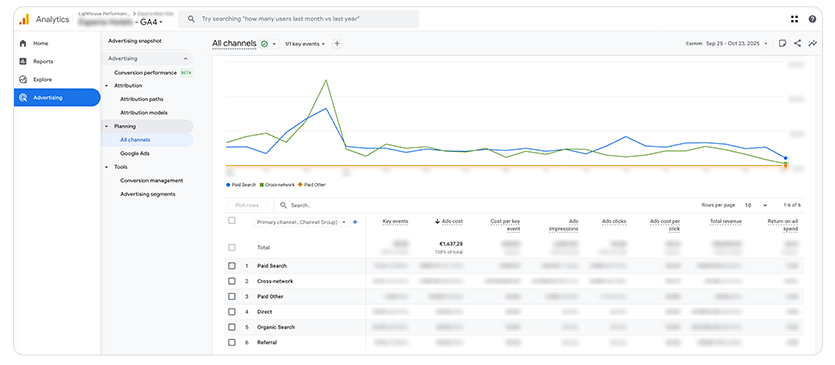
Once connected, GA4 fills Ads cost, Ads clicks, and Ads impressions for your Meta and TikTok traffic.
You can also elevate these KPIs into a customized report snapshot so stakeholders get the essentials at a glance.
- Advertising → Planning → All channels: cross-channel overview with cost, conversions, and revenue.
- Reports → Acquisition → Non-Google cost: detailed table for all imported non-Google media.
Google added native Data Import connectors for Meta Ads and TikTok Ads. After a one-time authorization, GA backfills historical data (subject to platform limits) and keeps it updated going forward.
Setup at a glance (per platform):
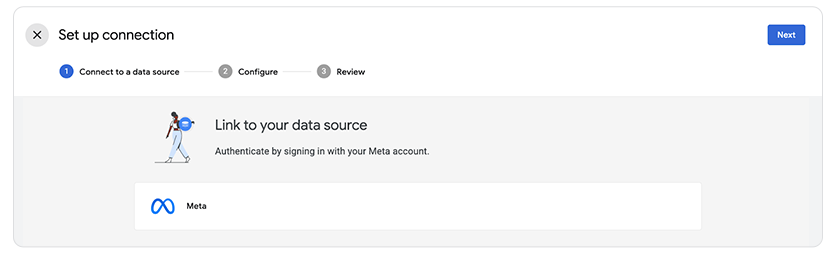
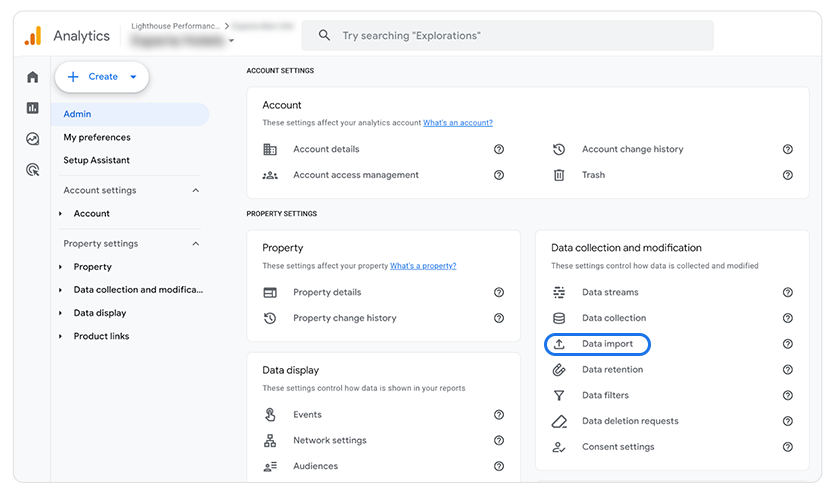
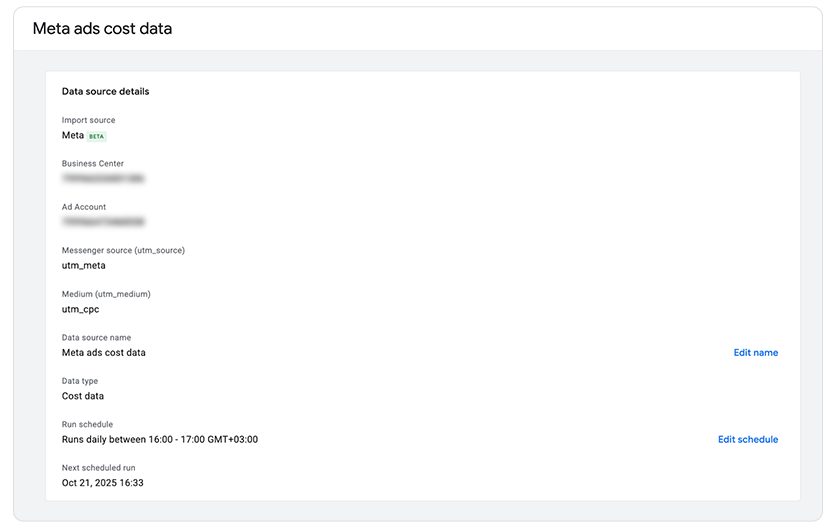
- In Admin → Data import, create a Cost data source and choose Meta Ads or TikTok Ads.
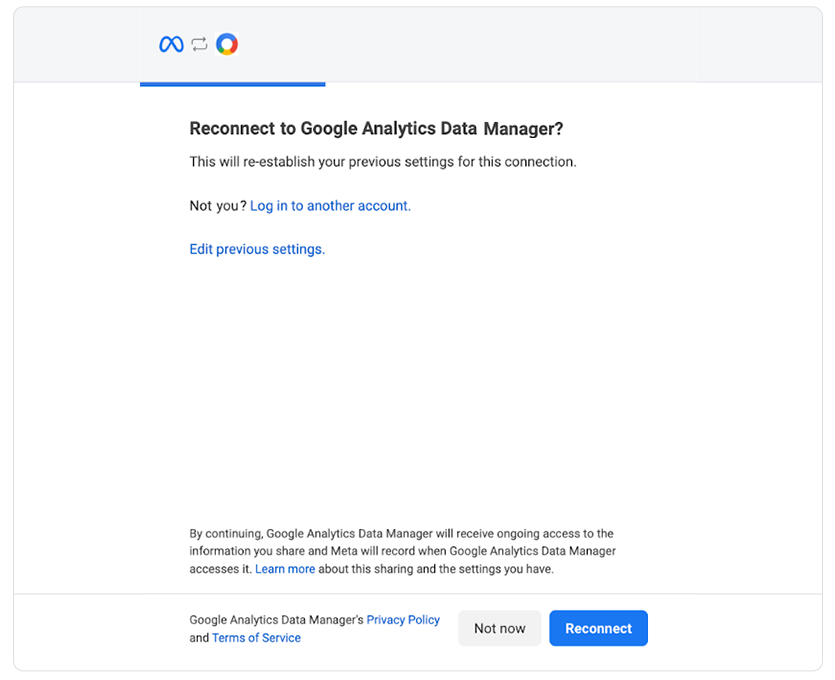
- Connect & authorize your ad account.
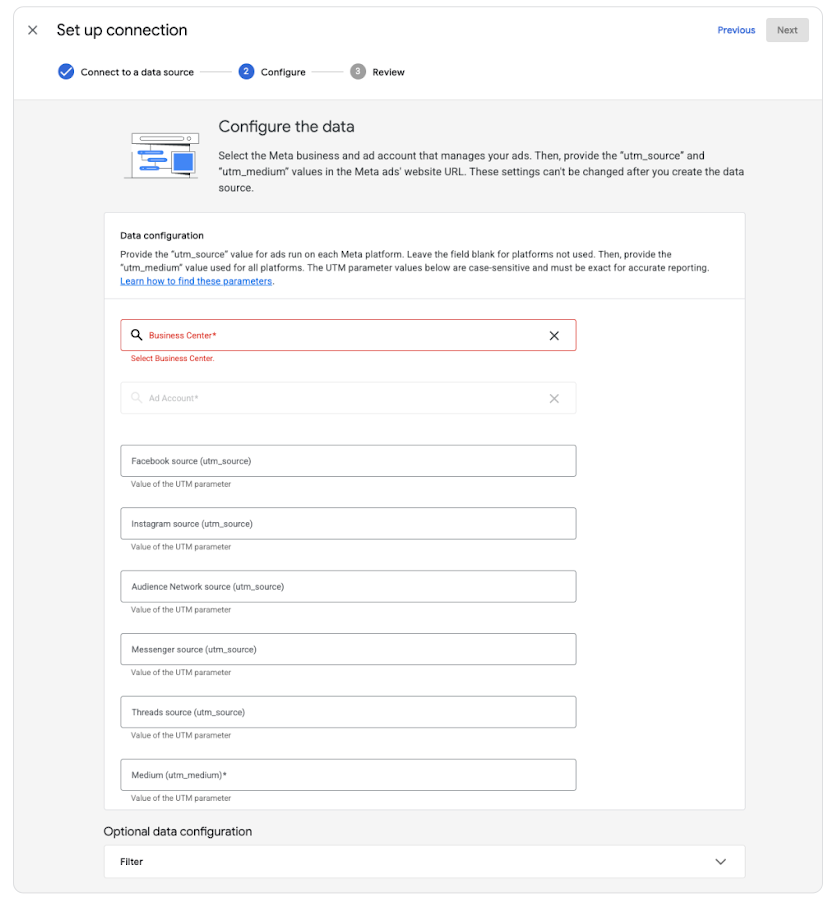
- Map your tagging (e.g., utm_source=facebook / instagram for Meta; utm_source=tiktok) and keep utm_medium/utm_campaign consistent with your conventions.
- Finish, then validate in the reports above after the first sync.
Hygiene notes
- Keep UTM tagging consistent so imported costs align with GA traffic.
- If you previously uploaded overlapping CSV cost files, remove those datasets first to avoid duplicates.
Already live for Lighthouse clients
We’ve already enabled these connectors across multiple Lighthouse accounts, aligning paid social costs with GA conversions and ecommerce KPIs. If you want to know what a top performance agency can do for your business, reach out to your Lighthouse team.
👉For step-by-step setup instructions, see Google’s guide here


