










Why Conversion Data Varies Across GA4, Google Ads, Meta Ads, and CRM
It’s common for an e-commerce business to see different numbers of purchases, transactions, or revenue when comparing Google Analytics 4 (GA4), Google Ads, Meta (Facebook/Instagram) Ads, and the company’s own CRM. Each platform uses its own tracking methods, attribution models, and reporting rules, so minor discrepancies are expected.
However, large variances can occur due to several technical and non-technical reasons, as outlined below. Even if you align attribution settings across platforms, these factors can still lead to significant differences.
1. Attribution Model & Conversion Window Differences
Different credit assignment:
Each platform attributes conversions differently along the customer journey.
Google Ads tends to give full credit to itself for a sale if an ad click was anywhere in the conversion path. GA4, on the other hand, uses cross-channel attribution – it looks at all traffic sources and might split or even shift credit to another channel if that was the last touch before conversion.
For example, if a customer clicks a Google ad, then later comes via an organic search and purchases, GA4 (with a “last click” model) will likely credit organic for the sale, whereas Google Ads will still count it as a Google Ads conversion. This alone causes GA4’s reported Google Ads conversions to be lower than what Google Ads reports, since GA4 might attribute some of those sales to organic, direct, or other channels. Conversely, if the sequence was organic-then-ad, GA4 would give full credit to the ad, but the key point is GA4 doesn’t always credit the ad if another channel came last.
Meta Ads have their own attribution model as well – typically last-touch within a 7-day click or 1-day view window by default – so Facebook will also claim 100% of a conversion if a user interacted with a Facebook ad in the path, even if another channel finally closed the sale.
Each platform essentially “plays by its own rules” in assigning credit, leading to inconsistent numbers for the “same” conversion when comparing platforms.
Attribution windows:
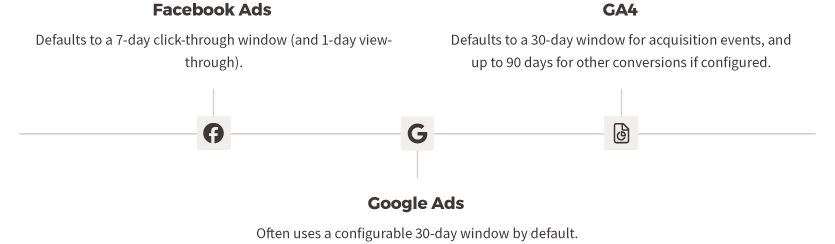
Even when you set all platforms to use a similar attribution model (e.g. last-click), the lookback windows can differ and affect counts. By default, Facebook Ads looks back only 7 days for click-through conversions (and 1 day for view-through).
Google Ads often uses a 30-day conversion window (configurable), and GA4’s default for acquisition events is 30 days (and up to 90 days for other conversions, if configured). If a customer takes longer than a week to convert, Facebook might not count that sale at all (if outside its 7-day window), whereas GA4 would attribute it (within 30 days) – or attribute it to another source that brought the user back.
This can make GA4 show conversions that Facebook doesn’t, or vice versa in some cases. In contrast, if a conversion happens very quickly, the windows matter less, but for longer consideration cycles this is a big factor. Aligning all windows (say, using a 7-day last-click on GA4 to match Facebook) can reduce differences, but any slight mismatch will drop some conversions from one report or another.
Single vs multi-touch credit:
Attribution model nuances can also cause partial credit assignment differences. GA4’s data-driven model (or even “last non-direct click”) may split revenue credit among channels. For instance, GA4 might attribute $85 of a $100 sale to Google Ads and $15 to Organic Search if both played a role. Google Ads, however, would report the full $100 under itself.
Even with last-click models aligned, GA4 by default ignores direct traffic as a credit source if another campaign preceded it, effectively crediting the last non-direct channel. This means if a user clicked a Google ad, then later came direct to the site to buy, GA4 would still credit the Google ad (since direct is ignored in cross-channel attribution), which actually helps GA4 attribute more to the ad in that scenario. But if the user came via a different channel (say an email or a Facebook ad after the Google ad), GA4 will credit the last channel.
Meanwhile, Google Ads will count the conversion as long as the Google ad click happened within its window, regardless of later touches. Facebook Ads similarly will count a conversion if a user clicked or viewed a FB ad prior to purchase, even if the final step was via another channel.
The result: Platforms often double-count the same conversion in their siloed reports (each claiming credit), while GA4 might count it only once and assign it to one channel. This multi-touch overlap causes platform reports summed together to far exceed the actual conversions in CRM. It’s a fundamental attribution discrepancy – each platform’s metrics are not measuring the exact same thing.
Timing of conversion reporting:

Another attribution difference is when the conversion is reported. Google Ads by default records a conversion on the date of the ad click that led to it, whereas GA4 records it on the date/time the transaction actually happened.
In practice, if a customer clicked an ad on March 1 and purchased on March 5, Google Ads will attribute that sale to March 1 in its reports, while GA4 will show it on March 5. If you pull reports for March 1-4, Google Ads would count that conversion (since the click was in that range) but GA4 would not (since the purchase hadn’t happened yet), leading to differences. Waiting ~15 days (or whatever your typical lag is) helps align totals, but if your analysis windows don’t perfectly account for this, mismatches occur.
Time zone settings can also play a minor role – if your GA4 property and Google Ads account use different time zones, a conversion near day-boundaries might fall on different dates in each system. Thus, even looking at the “same” date range, the inclusion/exclusion of some delayed conversions can differ.
2. Tracking Limitations and Technical Factors
Missing or blocked tracking:
Discrepancies often arise because one platform failed to track some users or orders due to technical factors. GA4 relies on first-party cookies and JavaScript running on the site to record events. If a user doesn’t accept cookies, has an ad-blocker, or disables JS, GA4 will not record their session or purchase. In the EU (like Greece), if the user declines analytics cookies, your GA4 might be legally prevented from tracking that visit, whereas the ad platforms might still register a conversion through other means (or at least the click).
For example, Facebook can track some interactions server-side or via its app login – users are logged into Facebook, so Facebook knows an ad was clicked even if GA’s browser tracking was blocked.
Similarly, Google Ads can use Consent Mode and modeling to estimate conversions that weren’t fully tracked due to cookie restrictions. In fact, Google Ads will often “model” missing conversions (using statistical methods) when tracking is limited, whereas your CRM and GA4 will only show actual observed transactions.
This can lead to Google Ads showing more conversions than GA4/CRM in some cases (filling in data that GA4 missed). On the other hand, an ad-blocker might outright block Google Analytics scripts but not block the loading of the actual website – in those cases the sale goes through (CRM sees it) and even the Google Ads click is recorded (Google Ads knows the user clicked), but GA4 got zero data about that session. This scenario will make GA4 undercount purchases versus both the ad platform and the real sales.
Cross-device tracking gaps:
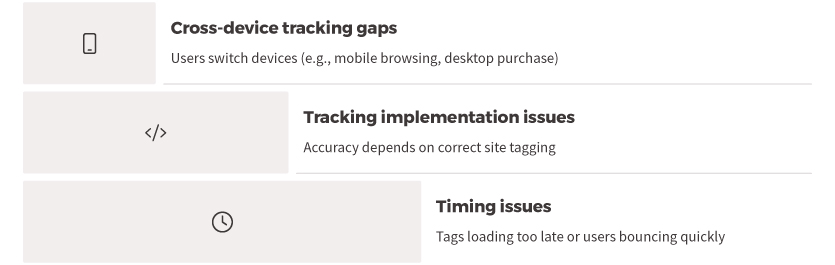
Users often switch devices – for instance, browsing on mobile and later purchasing on desktop. “More than 65% of conversions start on one device and finish on another,” according to Facebook.
GA4 might not recognize that the mobile click and desktop purchase are the same person (unless the user logs into your site or you have Google Signals enabled). It could easily log the desktop purchase as a new Direct visit conversion, with no link to the original mobile ad.
Facebook and Google Ads, however, have various methods to track across devices (Facebook via user login, Google via signed-in users or modeled cross-device conversions). This means the ad platforms can still attribute that sale to an ad click on the first device, while GA4 might attribute it to “Direct” on the second device (or split it into two separate user journeys) – causing the GA4 report for Facebook/Google Ads traffic to undercount.
In short, cross-device customers often get “lost” in GA4 attribution but are captured by platform-specific tracking, leading to lower GA4 conversion numbers for those channels compared to Google Ads or Meta reports.
Tracking implementation issues:
The accuracy of each platform’s data depends on correct tagging on the site. If the GA4 purchase event didn’t fire properly on the thank-you page (due to a coding error or tag misplacement), GA4 will miss that conversion entirely.
Meanwhile, if the Google Ads and Meta pixels fired correctly, they will count it – yielding a conversion that appears in Ads/Meta but not in GA4. The inverse can happen as well (e.g., if the Meta pixel was not installed on the checkout completion, Facebook won’t count some sales that GA4 and CRM do count).
A common issue is tag firing timing: if the GA4 tag is loaded too late or a user bounces quickly, the page may close before GA records the hit. For instance, if someone clicks an ad and then closes the landing page before it fully loads, Facebook will still count a click, but GA4 might not record a session at all (because its JS tracking code never executed).
This contributes to Facebook showing clicks (and possibly even some conversions via server-side signals) that GA4 never saw, creating a data gap. Ensuring the GA4 tag is high in the page and triggers reliably is important.
Referral and redirect issues:
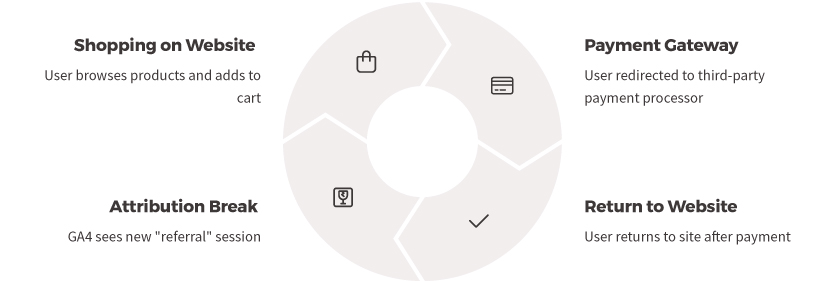
For e-commerce, using third-party payment gateways or external domains during checkout can mess up GA4 attribution if not handled. GA4 might interpret the return from PayPal or a bank’s payment page as a new “referral” session, thus attributing the purchase to the payment site instead of the original ad or source. “For example, using a gateway like Stripe or PayPal can cause conversions to be attributed to the Referral channel by mistake,” if you don’t exclude those domains. In such cases, GA4 will show a chunk of sales under “paypal.com / referral” or similar, which steals attribution away from Google Ads or Facebook in GA’s reports.
The ad platforms, however, still credit themselves for those conversions (since their tracking likely persisted through the redirect or via the click ID stored). This results in GA4 under-reporting the conversions for the actual marketing channels. Aligning referral exclusion settings in GA4 (and using gclid/FBCLID through the checkout) is crucial; otherwise, a huge discrepancy arises where Google Ads says (for example) 50 conversions came from the campaign, but GA4 might only show 30 under google/cpc because the rest got attributed to “Referral” or “Direct” due to the payment flow.
Duplicate or missed firing:
Implementation quirks can cause over-counting or under-counting on one platform relative to another. GA4 by design prevents double-counting the same transaction ID – if a user refreshes the confirmation page, GA4 should ignore the duplicate purchase event.
But if your Google Ads or Meta pixel isn’t set up to deduplicate, a refresh could fire a second conversion to those platforms. Over a month, a few double-fires (or test orders not filtered out) can make Google Ads report more conversions than actually occurred (CRM).
The opposite can happen too: if a user purchases but never loads the confirmation page (e.g., they abandon on the last step but the order actually goes through in the backend, or a confirmation email link completes the order), the CRM would count a sale that GA4 and pixels never saw.
Generally, GA4 might show fewer conversions due to missed hits, but it could show more if mis-configured (e.g. firing the purchase event multiple times per sale). Checking your tag setups (via debug tools) can help ensure all platforms are firing once per actual conversion.
Data filters and settings:
GA4 might have data filters that the CRM or ad platforms don’t use. For example, GA4 could be filtering out internal company traffic or test transactions, whereas the CRM records those orders. If not accounted for, GA4’s totals would be lower than CRM. Or GA4 might have filters/exclusions that accidentally filter some real customers (e.g., misidentified spam or a misconfigured inclusion filter).
Google Ads and Facebook typically count everything that triggers the pixel unless you apply specific filters. Ensuring consistent inclusion/exclusion (such as excluding internal orders from all platforms) is important to compare apples to apples.
Additionally, consent settings (like GA4’s handling of “do not track” signals) can cause GA4 to deliberately not collect certain users’ data, whereas your CRM obviously logs every sale regardless of user preferences, and Google Ads may use modeled data for those users. These technical nuances all contribute to why one system might show, say, 100 sales and another only 90 or 110 for the same timeframe.
3. Conversion Counting and Definition Differences
Clicks, sessions, and repeat visits:
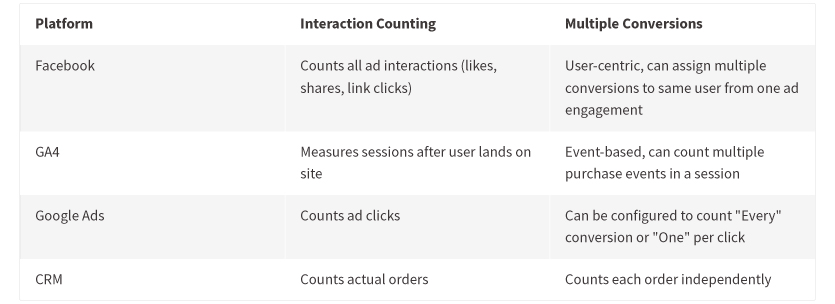
The fundamental metrics feeding conversion counts differ across platforms. As an example, Facebook “clicks” vs GA4 “sessions” often don’t match, which can confuse analysis. Facebook might report 1,000 ad clicks while GA4 shows 800 sessions from Facebook. This happens because Facebook’s click metric can include all clicks on an ad (including likes, shares, etc.), not just link clicks to your site. Even looking at link clicks, if a user clicks an ad twice quickly, Facebook counts two clicks, but GA4 might count that as a single session if it’s within the same 30-minute window.
Thus, conversion rates won’t line up unless you compare equivalent metrics (e.g., FB’s Landing Page Views vs GA sessions). While this is about traffic, it affects how we perceive conversion counts – one platform might simply start from a higher click count, making its conversion count or rate not directly comparable to GA’s session-based conversion count.
One conversion per session vs. multiple: GA (especially Universal Analytics) used to count at most one conversion per goal per session. If a user somehow completed two purchases in one session, UA would record one conversion (though e-commerce transactions were an exception – multiple transactions could be logged with distinct IDs). GA4 has shifted to an event-based model, so it can count multiple purchase events in a session if they occur.
Still, there is a conceptual difference: Google Analytics focuses on sessions and users, whereas a CRM counts each order independently. In a CRM or order system, if a user places two separate orders in a short time, it’s two sales. GA might roll that up differently depending on implementation (e.g., if the site forces a new session or not).
The Facebook platform is user-centric, so it might attribute multiple conversions to the same person from one ad engagement. Facebook is happy to report, for example, that one person who clicked an ad ended up buying twice (two conversions) and signing up for a newsletter (another conversion) – all of which it links to that one user/ad interaction.
Google Analytics, by contrast, typically attributes one conversion per journey or session in standard reports. If your business has repeat purchasers in a short span, Facebook could log more conversions (by counting each purchase) whereas GA4 might not count the second purchase under the initial session (if it happened in a separate session or after the attribution window).
Google Ads conversion settings also matter: Google Ads allows you to choose to count “Every” conversion or only “One” per click. For purchase tracking, you’d normally count every conversion (to capture every sale), but if this setting were misconfigured, Google Ads might undercount (e.g., only counting the first purchase from a click and ignoring subsequent ones). Ensuring each platform is set to count conversions in a comparable way (e.g., all purchase events, not just unique users) is necessary for closer alignment.
View-through (impression) conversions:
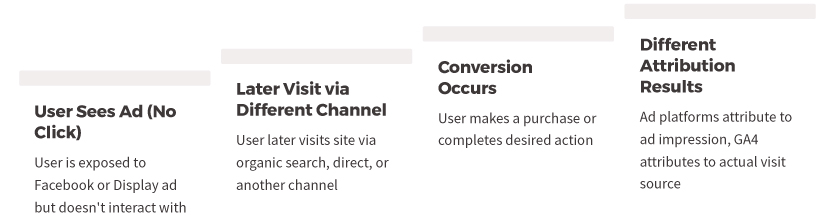
A major non-technical difference is that ad platforms count view-through conversions, while GA4 does not. If someone sees a Facebook or Instagram ad (but never clicks it) and later directly visits your site to purchase, Facebook will often still attribute that sale to the ad impression within its 1-day view-through window.
GA4, of course, has no way to connect an ad view to the conversion without a click – it will attribute that sale to “Direct” or whatever channel the user actually used to come to the site. This means Facebook’s conversion count can be higher than GA4’s for the Facebook/Meta channel, because Facebook is crediting some conversions that GA4 labels as direct or organic. (Notably, Facebook’s reporting doesn’t always make it obvious which conversions were view-through vs. click-through – it often combines them)
Google Ads as well can count view-through conversions (especially for display ads, YouTube, etc., if enabled). If you’re comparing Google Ads’ total conversion count to GA4’s count for Google CPC traffic, and some of those Google Ads conversions were view-through (e.g., someone saw a Display ad and later Googled the site), GA4 will attribute those to organic search, not the ad. Even with purely click-based campaigns, differences arise when users clear cookies or use different browsers: the ad network might still recognize the user’s ad interaction through login or fingerprinting, and GA4 might not.
In summary, GA4 only counts click-through attributable conversions, whereas ad platforms have a broader net for crediting conversions, which can inflate their numbers relative to GA.
Revenue calculation differences:
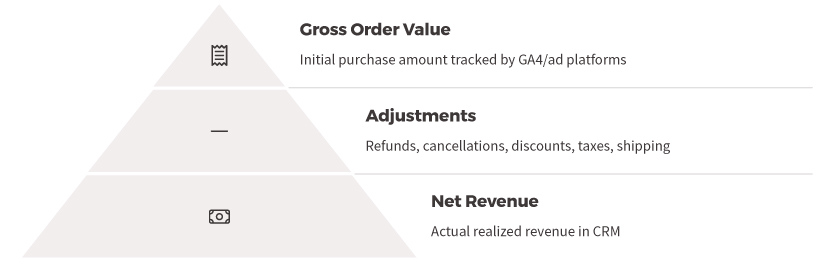
Apart from counts, revenue figures might differ due to definition and timing.
GA4 e-commerce tracking might include or exclude certain components (tax, shipping) depending on how it’s implemented. Your CRM might report net revenue after discounts, returns, or exclude VAT for internal reports, etc., whereas GA might be recording gross order value at time of purchase. If within that 2-month period many orders were refunded or canceled, the CRM likely has removed those from the revenue numbers, but GA4 (and Google Ads/Facebook, unless you manually send refund events) will still show the original purchase revenue. This can make GA4’s revenue higher than actual realized revenue.
Alternatively, if GA4 wasn’t passed certain coupon values or fees that the CRM accounts for, GA4 could show lower revenue. Currency and rounding can matter too – if one platform uses a different currency or rounding per transaction, small discrepancies add up (though if all are set to EUR for a Greek shop, this is minor).
Finally, transaction ID de-duplication in GA means GA4 won’t double-count the same order’s revenue, but if a duplicate firing happened on Facebook pixel, it might have counted the revenue twice (unless using offline conversions or order ID de-dupe logic). Always ensure the data layer/GTMs pass consistent values to all platforms. But even with perfect implementation, expect small differences in total revenue due to the above attribution and inclusion/exclusion factors.
The key is that each system is measuring slightly different sets of conversions; thus the sum of revenue in Google Ads + Facebook will definitely exceed actual sales (because of overlapping attribution), and GA4’s total revenue might be closer to actual but could miss some sales that went untracked or attribute some sales to other channels.
4. CRM vs Analytics Data (Ground-Truth Differences)
All sales vs tracked sales:
Your CRM or back-office system is the ground truth of orders, but it records data differently than analytics tools.
The CRM sees every order (online or even offline orders if logged), but GA4/Google Ads only track what their tags catch. Any order placed outside the website flow (e.g. phone orders entered by staff, or an offline sales event) will appear in CRM but not in GA4 or ad platforms at all. If that’s common, CRM will show higher totals than any online tracking. Conversely, if there were fake/test orders or canceled orders, the CRM might exclude them while GA4 initially tracked them, making GA4’s count higher.
One example: in some markets (including Greece), Cash on Delivery orders are common. GA4 would count the order at the time it’s placed online, but if a portion of those are never paid and get canceled, the CRM might not count them as completed purchases. Unless you remove or adjust those in GA4, it will overreport actual successful sales compared to CRM. These fulfillment discrepancies are non-technical but very real – the definition of a “conversion” isn’t identical between CRM (a confirmed, delivered sale) and GA4 (an order placed on the site, even if later returned).
Attribution in CRM reports:
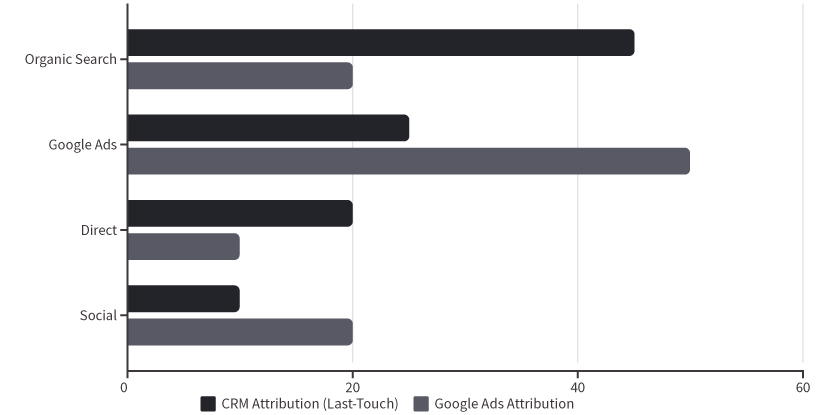
If the CRM is used for marketing reporting, it might attribute each sale to a source via last-click UTMs or referral at the time of purchase. This often ends up being a simpler last-touch model (and often last non-direct touch if implemented similarly to GA). If a sale came through organic search, the CRM will list it as organic; if from Google Ads, as Google CPC, etc.
However, the CRM’s attribution might not be as sophisticated as GA4’s (no multi-touch or lookback windows, it just takes whatever UTM was on the order). This can cause differences when comparing to Google Ads: e.g., Google Ads will count any sale that had a Google click in its history, but the CRM might only credit Google if it was the very last click. So Google Ads’ count can be higher than the CRM’s count of “Google-sourced” sales, because the CRM gave the credit to another channel in some cases. If the CRM and GA4 are not aligned on attribution logic, their channel breakdowns will differ (even if total sales match).
Typically, GA4 might be more generous to marketing channels (due to longer windows and cross-device tracking via Google signals) than a basic CRM attribution.
Data freshness and cutoff:
You mentioned looking at a period a while back (to allow attribution to catch up). This is smart – if you pull CRM data for, say, March–April, you likely have all real orders in that period.
GA4 and Ads also have most conversions logged by 15 days later. Still, slight lags or late attributions (e.g., a conversion that happened just at the end of April but credited to a late March ad click in Google Ads) can make alignment tricky.
Ensure the date ranges are consistent (e.g., compare total March–April in GA4 to March–April in CRM). Mismatched analysis periods or timing cutoffs are a simple but common source of discrepancies. Always double-check that the time zone and date range in GA4, Google Ads, and CRM reports truly line up.
In summary, there are numerous valid reasons why GA4 vs Google Ads vs Meta vs CRM will never perfectly match.
Sources: The explanations above draw on known platform behaviors and documented causes of data mismatches. For instance, Google’s own guidance notes that different attribution and filtering can cause Google Ads and GA4 to diverge (analyzify.com), and independent analyses highlight how Facebook/Meta’s tracking (especially post-iOS 14) and GA4 differ in counting conversions (ruleranalytics.com).
Technical audits have shown how missing GA tags or payment gateway referrals lead to GA under-counting vs. reality (data-marketing-school.com), while ad-blocking and user opt-outs disproportionately affect analytics data (medium.com). These factors, among others, are why your Google Ads, Facebook Ads, GA4, and CRM will rarely agree 1:1 on purchase numbers – each is accurate within its own framework, but they measure success via different lenses. The goal is to be aware of these differences and adjust expectations and analysis accordingly.
All Sources:
However, large variances can occur due to several technical and non-technical reasons, as outlined below. Even if you align attribution settings across platforms, these factors can still lead to significant differences.
1. Attribution Model & Conversion Window Differences
Different credit assignment:
Each platform attributes conversions differently along the customer journey.
Google Ads tends to give full credit to itself for a sale if an ad click was anywhere in the conversion path. GA4, on the other hand, uses cross-channel attribution – it looks at all traffic sources and might split or even shift credit to another channel if that was the last touch before conversion.
For example, if a customer clicks a Google ad, then later comes via an organic search and purchases, GA4 (with a “last click” model) will likely credit organic for the sale, whereas Google Ads will still count it as a Google Ads conversion. This alone causes GA4’s reported Google Ads conversions to be lower than what Google Ads reports, since GA4 might attribute some of those sales to organic, direct, or other channels. Conversely, if the sequence was organic-then-ad, GA4 would give full credit to the ad, but the key point is GA4 doesn’t always credit the ad if another channel came last.
Meta Ads have their own attribution model as well – typically last-touch within a 7-day click or 1-day view window by default – so Facebook will also claim 100% of a conversion if a user interacted with a Facebook ad in the path, even if another channel finally closed the sale.
Each platform essentially “plays by its own rules” in assigning credit, leading to inconsistent numbers for the “same” conversion when comparing platforms.
Attribution windows:
Even when you set all platforms to use a similar attribution model (e.g. last-click), the lookback windows can differ and affect counts. By default, Facebook Ads looks back only 7 days for click-through conversions (and 1 day for view-through).
Google Ads often uses a 30-day conversion window (configurable), and GA4’s default for acquisition events is 30 days (and up to 90 days for other conversions, if configured). If a customer takes longer than a week to convert, Facebook might not count that sale at all (if outside its 7-day window), whereas GA4 would attribute it (within 30 days) – or attribute it to another source that brought the user back.
This can make GA4 show conversions that Facebook doesn’t, or vice versa in some cases. In contrast, if a conversion happens very quickly, the windows matter less, but for longer consideration cycles this is a big factor. Aligning all windows (say, using a 7-day last-click on GA4 to match Facebook) can reduce differences, but any slight mismatch will drop some conversions from one report or another.
Single vs multi-touch credit:
Attribution model nuances can also cause partial credit assignment differences. GA4’s data-driven model (or even “last non-direct click”) may split revenue credit among channels. For instance, GA4 might attribute $85 of a $100 sale to Google Ads and $15 to Organic Search if both played a role. Google Ads, however, would report the full $100 under itself.
Even with last-click models aligned, GA4 by default ignores direct traffic as a credit source if another campaign preceded it, effectively crediting the last non-direct channel. This means if a user clicked a Google ad, then later came direct to the site to buy, GA4 would still credit the Google ad (since direct is ignored in cross-channel attribution), which actually helps GA4 attribute more to the ad in that scenario. But if the user came via a different channel (say an email or a Facebook ad after the Google ad), GA4 will credit the last channel.
Meanwhile, Google Ads will count the conversion as long as the Google ad click happened within its window, regardless of later touches. Facebook Ads similarly will count a conversion if a user clicked or viewed a FB ad prior to purchase, even if the final step was via another channel.
The result: Platforms often double-count the same conversion in their siloed reports (each claiming credit), while GA4 might count it only once and assign it to one channel. This multi-touch overlap causes platform reports summed together to far exceed the actual conversions in CRM. It’s a fundamental attribution discrepancy – each platform’s metrics are not measuring the exact same thing.
Timing of conversion reporting:
Another attribution difference is when the conversion is reported. Google Ads by default records a conversion on the date of the ad click that led to it, whereas GA4 records it on the date/time the transaction actually happened.
In practice, if a customer clicked an ad on March 1 and purchased on March 5, Google Ads will attribute that sale to March 1 in its reports, while GA4 will show it on March 5. If you pull reports for March 1-4, Google Ads would count that conversion (since the click was in that range) but GA4 would not (since the purchase hadn’t happened yet), leading to differences. Waiting ~15 days (or whatever your typical lag is) helps align totals, but if your analysis windows don’t perfectly account for this, mismatches occur.
Time zone settings can also play a minor role – if your GA4 property and Google Ads account use different time zones, a conversion near day-boundaries might fall on different dates in each system. Thus, even looking at the “same” date range, the inclusion/exclusion of some delayed conversions can differ.
2. Tracking Limitations and Technical Factors
Missing or blocked tracking:
Discrepancies often arise because one platform failed to track some users or orders due to technical factors. GA4 relies on first-party cookies and JavaScript running on the site to record events. If a user doesn’t accept cookies, has an ad-blocker, or disables JS, GA4 will not record their session or purchase. In the EU (like Greece), if the user declines analytics cookies, your GA4 might be legally prevented from tracking that visit, whereas the ad platforms might still register a conversion through other means (or at least the click).
For example, Facebook can track some interactions server-side or via its app login – users are logged into Facebook, so Facebook knows an ad was clicked even if GA’s browser tracking was blocked.
Similarly, Google Ads can use Consent Mode and modeling to estimate conversions that weren’t fully tracked due to cookie restrictions. In fact, Google Ads will often “model” missing conversions (using statistical methods) when tracking is limited, whereas your CRM and GA4 will only show actual observed transactions.
This can lead to Google Ads showing more conversions than GA4/CRM in some cases (filling in data that GA4 missed). On the other hand, an ad-blocker might outright block Google Analytics scripts but not block the loading of the actual website – in those cases the sale goes through (CRM sees it) and even the Google Ads click is recorded (Google Ads knows the user clicked), but GA4 got zero data about that session. This scenario will make GA4 undercount purchases versus both the ad platform and the real sales.
Cross-device tracking gaps:
Users often switch devices – for instance, browsing on mobile and later purchasing on desktop. “More than 65% of conversions start on one device and finish on another,” according to Facebook.
GA4 might not recognize that the mobile click and desktop purchase are the same person (unless the user logs into your site or you have Google Signals enabled). It could easily log the desktop purchase as a new Direct visit conversion, with no link to the original mobile ad.
Facebook and Google Ads, however, have various methods to track across devices (Facebook via user login, Google via signed-in users or modeled cross-device conversions). This means the ad platforms can still attribute that sale to an ad click on the first device, while GA4 might attribute it to “Direct” on the second device (or split it into two separate user journeys) – causing the GA4 report for Facebook/Google Ads traffic to undercount.
In short, cross-device customers often get “lost” in GA4 attribution but are captured by platform-specific tracking, leading to lower GA4 conversion numbers for those channels compared to Google Ads or Meta reports.
Tracking implementation issues:
The accuracy of each platform’s data depends on correct tagging on the site. If the GA4 purchase event didn’t fire properly on the thank-you page (due to a coding error or tag misplacement), GA4 will miss that conversion entirely.
Meanwhile, if the Google Ads and Meta pixels fired correctly, they will count it – yielding a conversion that appears in Ads/Meta but not in GA4. The inverse can happen as well (e.g., if the Meta pixel was not installed on the checkout completion, Facebook won’t count some sales that GA4 and CRM do count).
A common issue is tag firing timing: if the GA4 tag is loaded too late or a user bounces quickly, the page may close before GA records the hit. For instance, if someone clicks an ad and then closes the landing page before it fully loads, Facebook will still count a click, but GA4 might not record a session at all (because its JS tracking code never executed).
This contributes to Facebook showing clicks (and possibly even some conversions via server-side signals) that GA4 never saw, creating a data gap. Ensuring the GA4 tag is high in the page and triggers reliably is important.
Referral and redirect issues:
For e-commerce, using third-party payment gateways or external domains during checkout can mess up GA4 attribution if not handled. GA4 might interpret the return from PayPal or a bank’s payment page as a new “referral” session, thus attributing the purchase to the payment site instead of the original ad or source. “For example, using a gateway like Stripe or PayPal can cause conversions to be attributed to the Referral channel by mistake,” if you don’t exclude those domains. In such cases, GA4 will show a chunk of sales under “paypal.com / referral” or similar, which steals attribution away from Google Ads or Facebook in GA’s reports.
The ad platforms, however, still credit themselves for those conversions (since their tracking likely persisted through the redirect or via the click ID stored). This results in GA4 under-reporting the conversions for the actual marketing channels. Aligning referral exclusion settings in GA4 (and using gclid/FBCLID through the checkout) is crucial; otherwise, a huge discrepancy arises where Google Ads says (for example) 50 conversions came from the campaign, but GA4 might only show 30 under google/cpc because the rest got attributed to “Referral” or “Direct” due to the payment flow.
Duplicate or missed firing:
Implementation quirks can cause over-counting or under-counting on one platform relative to another. GA4 by design prevents double-counting the same transaction ID – if a user refreshes the confirmation page, GA4 should ignore the duplicate purchase event.
But if your Google Ads or Meta pixel isn’t set up to deduplicate, a refresh could fire a second conversion to those platforms. Over a month, a few double-fires (or test orders not filtered out) can make Google Ads report more conversions than actually occurred (CRM).
The opposite can happen too: if a user purchases but never loads the confirmation page (e.g., they abandon on the last step but the order actually goes through in the backend, or a confirmation email link completes the order), the CRM would count a sale that GA4 and pixels never saw.
Generally, GA4 might show fewer conversions due to missed hits, but it could show more if mis-configured (e.g. firing the purchase event multiple times per sale). Checking your tag setups (via debug tools) can help ensure all platforms are firing once per actual conversion.
Data filters and settings:
GA4 might have data filters that the CRM or ad platforms don’t use. For example, GA4 could be filtering out internal company traffic or test transactions, whereas the CRM records those orders. If not accounted for, GA4’s totals would be lower than CRM. Or GA4 might have filters/exclusions that accidentally filter some real customers (e.g., misidentified spam or a misconfigured inclusion filter).
Google Ads and Facebook typically count everything that triggers the pixel unless you apply specific filters. Ensuring consistent inclusion/exclusion (such as excluding internal orders from all platforms) is important to compare apples to apples.
Additionally, consent settings (like GA4’s handling of “do not track” signals) can cause GA4 to deliberately not collect certain users’ data, whereas your CRM obviously logs every sale regardless of user preferences, and Google Ads may use modeled data for those users. These technical nuances all contribute to why one system might show, say, 100 sales and another only 90 or 110 for the same timeframe.
3. Conversion Counting and Definition Differences
Clicks, sessions, and repeat visits:
The fundamental metrics feeding conversion counts differ across platforms. As an example, Facebook “clicks” vs GA4 “sessions” often don’t match, which can confuse analysis. Facebook might report 1,000 ad clicks while GA4 shows 800 sessions from Facebook. This happens because Facebook’s click metric can include all clicks on an ad (including likes, shares, etc.), not just link clicks to your site. Even looking at link clicks, if a user clicks an ad twice quickly, Facebook counts two clicks, but GA4 might count that as a single session if it’s within the same 30-minute window.
Thus, conversion rates won’t line up unless you compare equivalent metrics (e.g., FB’s Landing Page Views vs GA sessions). While this is about traffic, it affects how we perceive conversion counts – one platform might simply start from a higher click count, making its conversion count or rate not directly comparable to GA’s session-based conversion count.
One conversion per session vs. multiple: GA (especially Universal Analytics) used to count at most one conversion per goal per session. If a user somehow completed two purchases in one session, UA would record one conversion (though e-commerce transactions were an exception – multiple transactions could be logged with distinct IDs). GA4 has shifted to an event-based model, so it can count multiple purchase events in a session if they occur.
Still, there is a conceptual difference: Google Analytics focuses on sessions and users, whereas a CRM counts each order independently. In a CRM or order system, if a user places two separate orders in a short time, it’s two sales. GA might roll that up differently depending on implementation (e.g., if the site forces a new session or not).
The Facebook platform is user-centric, so it might attribute multiple conversions to the same person from one ad engagement. Facebook is happy to report, for example, that one person who clicked an ad ended up buying twice (two conversions) and signing up for a newsletter (another conversion) – all of which it links to that one user/ad interaction.
Google Analytics, by contrast, typically attributes one conversion per journey or session in standard reports. If your business has repeat purchasers in a short span, Facebook could log more conversions (by counting each purchase) whereas GA4 might not count the second purchase under the initial session (if it happened in a separate session or after the attribution window).
Google Ads conversion settings also matter: Google Ads allows you to choose to count “Every” conversion or only “One” per click. For purchase tracking, you’d normally count every conversion (to capture every sale), but if this setting were misconfigured, Google Ads might undercount (e.g., only counting the first purchase from a click and ignoring subsequent ones). Ensuring each platform is set to count conversions in a comparable way (e.g., all purchase events, not just unique users) is necessary for closer alignment.
View-through (impression) conversions:
A major non-technical difference is that ad platforms count view-through conversions, while GA4 does not. If someone sees a Facebook or Instagram ad (but never clicks it) and later directly visits your site to purchase, Facebook will often still attribute that sale to the ad impression within its 1-day view-through window.
GA4, of course, has no way to connect an ad view to the conversion without a click – it will attribute that sale to “Direct” or whatever channel the user actually used to come to the site. This means Facebook’s conversion count can be higher than GA4’s for the Facebook/Meta channel, because Facebook is crediting some conversions that GA4 labels as direct or organic. (Notably, Facebook’s reporting doesn’t always make it obvious which conversions were view-through vs. click-through – it often combines them)
Google Ads as well can count view-through conversions (especially for display ads, YouTube, etc., if enabled). If you’re comparing Google Ads’ total conversion count to GA4’s count for Google CPC traffic, and some of those Google Ads conversions were view-through (e.g., someone saw a Display ad and later Googled the site), GA4 will attribute those to organic search, not the ad. Even with purely click-based campaigns, differences arise when users clear cookies or use different browsers: the ad network might still recognize the user’s ad interaction through login or fingerprinting, and GA4 might not.
In summary, GA4 only counts click-through attributable conversions, whereas ad platforms have a broader net for crediting conversions, which can inflate their numbers relative to GA.
Revenue calculation differences:
Apart from counts, revenue figures might differ due to definition and timing.
GA4 e-commerce tracking might include or exclude certain components (tax, shipping) depending on how it’s implemented. Your CRM might report net revenue after discounts, returns, or exclude VAT for internal reports, etc., whereas GA might be recording gross order value at time of purchase. If within that 2-month period many orders were refunded or canceled, the CRM likely has removed those from the revenue numbers, but GA4 (and Google Ads/Facebook, unless you manually send refund events) will still show the original purchase revenue. This can make GA4’s revenue higher than actual realized revenue.
Alternatively, if GA4 wasn’t passed certain coupon values or fees that the CRM accounts for, GA4 could show lower revenue. Currency and rounding can matter too – if one platform uses a different currency or rounding per transaction, small discrepancies add up (though if all are set to EUR for a Greek shop, this is minor).
Finally, transaction ID de-duplication in GA means GA4 won’t double-count the same order’s revenue, but if a duplicate firing happened on Facebook pixel, it might have counted the revenue twice (unless using offline conversions or order ID de-dupe logic). Always ensure the data layer/GTMs pass consistent values to all platforms. But even with perfect implementation, expect small differences in total revenue due to the above attribution and inclusion/exclusion factors.
The key is that each system is measuring slightly different sets of conversions; thus the sum of revenue in Google Ads + Facebook will definitely exceed actual sales (because of overlapping attribution), and GA4’s total revenue might be closer to actual but could miss some sales that went untracked or attribute some sales to other channels.
4. CRM vs Analytics Data (Ground-Truth Differences)
All sales vs tracked sales:
Your CRM or back-office system is the ground truth of orders, but it records data differently than analytics tools.
The CRM sees every order (online or even offline orders if logged), but GA4/Google Ads only track what their tags catch. Any order placed outside the website flow (e.g. phone orders entered by staff, or an offline sales event) will appear in CRM but not in GA4 or ad platforms at all. If that’s common, CRM will show higher totals than any online tracking. Conversely, if there were fake/test orders or canceled orders, the CRM might exclude them while GA4 initially tracked them, making GA4’s count higher.
One example: in some markets (including Greece), Cash on Delivery orders are common. GA4 would count the order at the time it’s placed online, but if a portion of those are never paid and get canceled, the CRM might not count them as completed purchases. Unless you remove or adjust those in GA4, it will overreport actual successful sales compared to CRM. These fulfillment discrepancies are non-technical but very real – the definition of a “conversion” isn’t identical between CRM (a confirmed, delivered sale) and GA4 (an order placed on the site, even if later returned).
Attribution in CRM reports:
If the CRM is used for marketing reporting, it might attribute each sale to a source via last-click UTMs or referral at the time of purchase. This often ends up being a simpler last-touch model (and often last non-direct touch if implemented similarly to GA). If a sale came through organic search, the CRM will list it as organic; if from Google Ads, as Google CPC, etc.
However, the CRM’s attribution might not be as sophisticated as GA4’s (no multi-touch or lookback windows, it just takes whatever UTM was on the order). This can cause differences when comparing to Google Ads: e.g., Google Ads will count any sale that had a Google click in its history, but the CRM might only credit Google if it was the very last click. So Google Ads’ count can be higher than the CRM’s count of “Google-sourced” sales, because the CRM gave the credit to another channel in some cases. If the CRM and GA4 are not aligned on attribution logic, their channel breakdowns will differ (even if total sales match).
Typically, GA4 might be more generous to marketing channels (due to longer windows and cross-device tracking via Google signals) than a basic CRM attribution.
Data freshness and cutoff:
You mentioned looking at a period a while back (to allow attribution to catch up). This is smart – if you pull CRM data for, say, March–April, you likely have all real orders in that period.
GA4 and Ads also have most conversions logged by 15 days later. Still, slight lags or late attributions (e.g., a conversion that happened just at the end of April but credited to a late March ad click in Google Ads) can make alignment tricky.
Ensure the date ranges are consistent (e.g., compare total March–April in GA4 to March–April in CRM). Mismatched analysis periods or timing cutoffs are a simple but common source of discrepancies. Always double-check that the time zone and date range in GA4, Google Ads, and CRM reports truly line up.
In summary, there are numerous valid reasons why GA4 vs Google Ads vs Meta vs CRM will never perfectly match.
- Key reasons include attribution model differences (who gets credit for a sale, and when), tracking and data collection gaps (differences in cookies, cross-device tracking, blockers, and tag firing), inconsistent conversion definitions and counting (how each counts a “conversion” and handles repeats or view-through), and the fundamental scope of data (CRM records actual completed sales, while analytics tools record observed events under various assumptions).
- Even when you align attribution settings across GA4 and the ad platforms, you can still see large gaps because, for instance, GA4 might not track 100% of conversions due to technical reasons, and each ad platform will still claim conversions that GA4 attributes elsewhere.
- Minor discrepancies (a few percentage points) are normal, but if you’re seeing huge differences, it’s likely a combination of the above factors at play. Understanding these reasons can help you explain the numbers to stakeholders and take steps to minimize gaps – for example, by improving tracking (using server-side tagging to mitigate blocked cookies), adjusting GA4 settings (referral exclusions, attribution windows), and using CRM data to validate the overall totals. Ultimately, no single platform gives the full picture, so expect differences and focus on trends within each platform rather than raw absolute figures between them.
Sources: The explanations above draw on known platform behaviors and documented causes of data mismatches. For instance, Google’s own guidance notes that different attribution and filtering can cause Google Ads and GA4 to diverge (analyzify.com), and independent analyses highlight how Facebook/Meta’s tracking (especially post-iOS 14) and GA4 differ in counting conversions (ruleranalytics.com).
Technical audits have shown how missing GA tags or payment gateway referrals lead to GA under-counting vs. reality (data-marketing-school.com), while ad-blocking and user opt-outs disproportionately affect analytics data (medium.com). These factors, among others, are why your Google Ads, Facebook Ads, GA4, and CRM will rarely agree 1:1 on purchase numbers – each is accurate within its own framework, but they measure success via different lenses. The goal is to be aware of these differences and adjust expectations and analysis accordingly.
All Sources:
- https://analyzify.com/hub/discrepancy-between-google-ads-and-ga4
- https://www.reddit.com/r/PPC/comments/1i7c6sk/help_explain_why_crm_does_not_match_google_ads/
- https://data-marketing-school.com/en/blog/google-analytics/referral-traffic/
- https://medium.com/dp6-us-blog/discrepancies-part-2-ga-and-crm-9454a770a58a
- https://www.ruleranalytics.com/blog/analytics/facebook-ads-google-analytics-discrepancy/
- https://support.google.com/google-ads/thread/259090948/google-ads-is-showing-different-conversions-numbers-than-ga4?hl=en
- https://www.reddit.com/r/PPC/comments/1i7c6sk/help_explain_why_crm_does_not_match_google_ads/


